How it works

From link to finished ID photo.

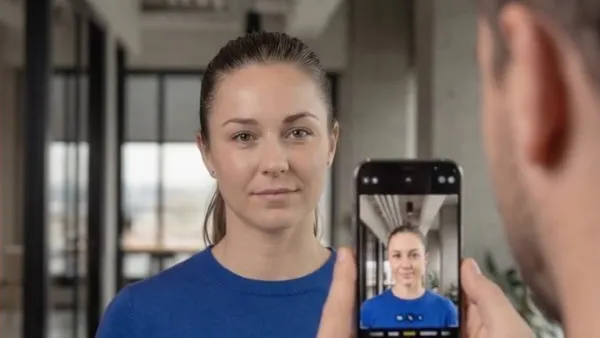
You send the invitation, the person takes their photo with their own smartphone, and Photo Collect checks, processes, and transfers the photo to your system. No app, no login, no photo appointment.

  1. 01Photo captureInvitation by email, SMS, or QR code, photo taken with a smartphone
  2. 02Checking and processing35+ automatic checks, cropping and background to your specifications
  3. 03IntegrationTransfer via ZIP, sFTP, or API, then deleted automatically
Take a test photo
01 Photo capture

Companies or institutions send the link by email or SMS. Captured with your own smartphone.

5M+photos processed
< 2 minper person (median)
35+automatic checks per photo
90%less effort

Step by step

What happens at each step.

Seven moments, three steps. As you scroll, the animation shows the matching scene.

Photo capture

The organization

Invitation in one click

You select the people and send the invitation by email, SMS, or QR code in a letter. The link is personal: the person is already assigned, for example via their employee or reference number.

Upload links can also be embedded in existing applications via API or deep link. Anyone who doesn't respond automatically receives a reminder.

  • Email
  • SMS
  • QR code
  • API and deep link

The person

Instructions instead of a photo appointment

The link opens photo capture directly in the browser, without an app or login, in your corporate design. Three short tips, then a tap on “Start capture.” An existing image from the library works too.

  • Ask someone to take your photo
  • Light from the front
  • No photos of printouts

The person

Capture with live hints

Ideally someone else takes the photo, but a selfie works too. The camera gives instant hints until the image is right. An uncluttered background is enough, as it is replaced automatically.

Tap a hint to see it in action.

Checking and processing

Photo Collect

35+ checks, then processed automatically

The AI checks the image instantly according to ICAO 9303 and ISO/IEC 19794-5 and processes it to your specifications. Depending on the image, this takes 15 to 40 seconds. If a check fails, the person immediately receives specific instructions.

Validation
  • Face detected
  • Head facing forward
  • Eyes open
  • Resolution
  • and over 30 more
Processing
  • Alignment
  • Background replaced
  • Crop, e.g., 3:4
All checks at a glance

The person

Check the preview and submit

The person sees their photo in the target format, with the face unchanged and no generative AI. If it looks right, one tap on “Yes, submit” is all it takes. Otherwise, they simply take another photo.

From opening the link to this point, a person needs under two minutes (median).

How the time adds up

Integration

The organization

Back with you, checked

The photo appears in the console with the right record: “Validated · all checks passed.” If you like, you can also approve it manually, about one second per photo.

Photo Collect

Transfer to the target system, then deleted

Photo Collect transfers the photo via ZIP, sFTP, or REST API, named by your ID, such as the employee or customer number. The data is then deleted automatically.

  • CompaniesEmployee ID cardZIP
  • InstitutionsDriver’s licensesFTP
  • IT systemsHR systemAPI
How much effort this saves

For everyone

Location-independent or on site.

Most people take their photo at home or on the go. For people without a smartphone, there is on-site capture with the same checks.

A colleague takes a photo of an employee with a smartphone; the display shows the photo capture screen
Location-independent

With your own smartphone

Personal link by email, SMS, or QR code, also embedded via API or deep link.

  • Upload without login or app
  • AI-based validation and processing
  • Scales to thousands of photos per day
An employee uses the Photo Collect photo kiosk at reception
On site

With a kiosk or staff-operated app

At reception or in the card office: a self-service kiosk or the app your team uses to take the photo.

  • Guided capture
  • Built-in background removal, no photo booth
  • Can be set up off-grid, wireless with 5G
“We save a great deal of time because there is no more appointment scheduling.”
Ari Schuster, Head of Security, Krones AG Read more

Frequently asked questions about the process

Does the person need an app or a login?

No. The personal link opens photo capture directly in the smartphone's browser.

What if a photo isn't suitable?

The person immediately receives specific instructions and takes a new photo. Over 96% of photos are usable on the first attempt.

How does the photo get into our system?

Via ZIP download, sFTP, or REST API, named by your ID, such as the employee or customer number.

What happens to the data?

After transfer to the target system, the data is deleted automatically.

And people without a smartphone?

Their photos are taken at the photo kiosk or with the staff-operated app at reception or in the card office.

Try Photo Collect in two minutes.

Take a test photo

Cookie settings

Your choices apply to this website. You can change or withdraw them at any time through the footer.

Stores your privacy choices, light or dark mode, and country for regional display.

Allows Google Analytics to use cookies for visitor statistics.

Allows Google Ads to use cookies and data for advertising measurement and personalised advertising.

Allows embedded YouTube videos. Google receives your IP address and may store data on your device.

Google may receive cookieless measurement signals even when analytics and marketing cookies are rejected. Plausible measures visits without cookies.

Cookie policy How Google uses data

JavaScript is disabled. Optional Google tags and YouTube videos are not loaded.

Discuss your project

Consultations are for organizations interested in using Photo Collect. Please enter your work email address.

Please enable JavaScript to book a consultation.